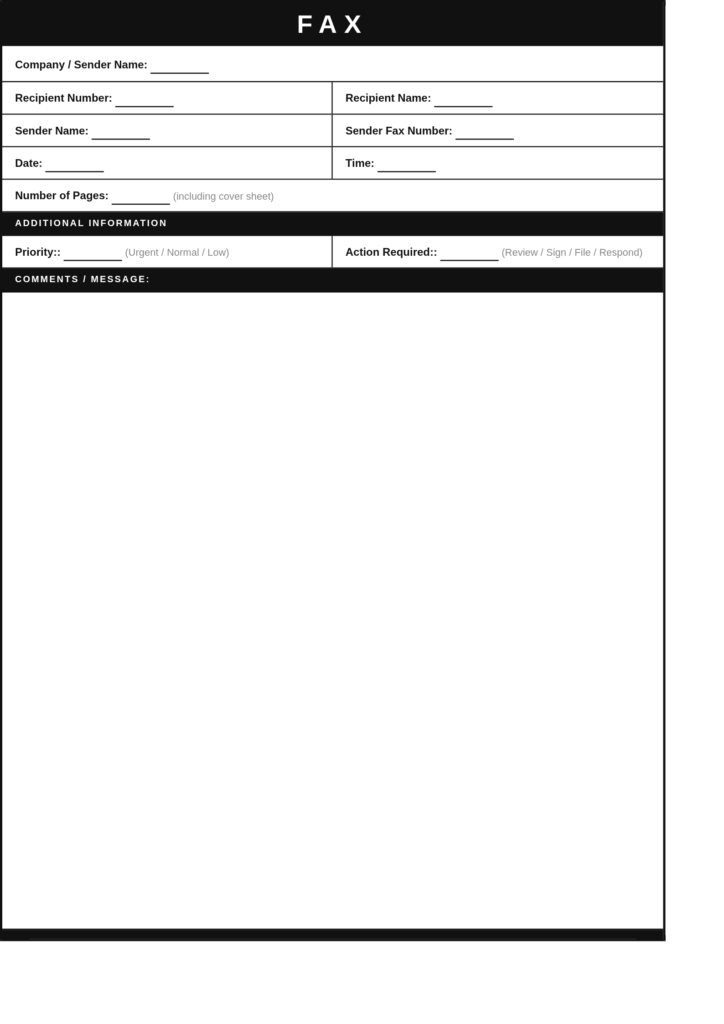
A free quick fax cover sheet template provides a ready-to-use format for individuals and businesses that need a simple fax cover page. Instead of spending time creating a new document, users can download a template, fill in the required information, and prepare their fax immediately.
A basic quick fax cover sheet includes:
- Sender name
- Company name (if applicable)
- Sender phone number
- Sender fax number
- Recipient name
- Recipient fax number
- Date
- Number of pages
- Subject line
- Short message or instructions
These templates are designed to be easy to understand and complete, making them suitable for both beginners and professionals.
Available Formats:
- PDF
- Microsoft Word
- Google Docs
What Is a Quick Fax Cover Sheet?
A Quick Fax Cover Sheet is a short and simple cover page attached to a fax transmission. Its purpose is to provide basic information about the fax without adding unnecessary details.
A standard fax cover sheet may include multiple sections for specific industries, while a quick fax cover page only contains the information needed for immediate document delivery.
It is commonly used when sending:
- Business forms
- Invoices
- Receipts
- Applications
- General office documents
- Personal paperwork
- Internal communications
The main goal of a quick fax template is to make faxing faster while maintaining a professional appearance.
Why Use a Quick Fax Cover Page?
A quick fax cover page offers several benefits for users who need a fast and efficient way to send documents.
1. Saves Time
Creating a fax cover page manually can take unnecessary time. A ready-made quick fax template allows users to enter their details and prepare the document within minutes.
2. Simple and Easy to Complete
A quick fax cover sheet contains only essential fields, making it easier to complete compared to complex fax forms.
3. Improves Document Organization
Including sender, recipient, and document details helps the receiver understand the purpose of the fax immediately.
4. Creates a Professional Impression
Even a simple fax transmission looks more professional when it includes a properly formatted cover page.
5. Reduces Faxing Errors
A clear format helps prevent mistakes such as missing recipient information, incorrect page counts, or unclear document descriptions.
Information Included in a Quick Fax Cover Sheet
Although a quick fax cover page is designed for simplicity, it should still include important details for smooth communication.
Sender Information
The sender section may include:
- Full name
- Company or organisation name
- Contact number
- Email address
- Fax number
Recipient Information
The recipient section should include:
- Recipient name
- Department or company
- Fax number
- Contact information
Fax Details
Important transmission details include:
- Date sent
- Total number of pages
- Subject
- Message or instructions
These details help the recipient identify and process the fax correctly.
Printable Quick Fax Cover Sheet
A printable quick fax cover sheet is a convenient option for users who prefer preparing documents manually before sending them through a fax machine.
Printable templates can be downloaded, completed, and printed whenever required. They are useful for:
- Small businesses
- Home offices
- Administrative teams
- Individuals sending occasional faxes
A printable fax cover page provides a professional format without requiring advanced editing skills.
Simple Fax Cover Sheet for Everyday Use
A simple fax cover sheet is suitable for situations where a detailed explanation is unnecessary. It focuses on the basic information needed for successful document delivery.
Common examples include:
- Sending signed documents
- Sharing completed forms
- Transmitting office paperwork
- Submitting applications
- Sending confirmation documents
A simple format ensures that users can complete the fax cover page quickly and avoid unnecessary delays.
Quick Fax Cover Sheet Template for Businesses
Businesses often need to send documents quickly between departments, clients, vendors, and partners. A quick fax cover sheet template helps maintain professional communication while reducing preparation time.
Businesses may use quick fax templates for:
- Purchase orders
- Invoices
- Client documents
- Service agreements
- Office records
- Administrative paperwork
Companies can customize templates by adding their logo, contact information, and branding details.
One Page Fax Cover Sheet
A one page fax cover sheet is designed to provide all necessary information in a compact format. It is ideal for users who want a clean and efficient fax document.
A one-page layout typically includes:
- Sender details at the top
- Recipient information
- Fax summary
- Message section
- Page count
Keeping everything on one page makes the document easy to read and convenient to store.
Quick Fax Cover Sheet PDF and Word Template
A downloadable quick fax cover sheet PDF or Word file makes fax preparation faster and more convenient.
Different formats provide flexibility:
PDF Format
Useful for:
- Printing
- Sharing digitally
- Maintaining consistent formatting
Word Format
Useful for:
- Editing text
- Adding company details
- Customising sections
Google Docs Format
Useful for:
- Online editing
- Access from multiple devices
- Easy sharing
Having multiple formats allows users to choose the option that best fits their workflow.
Common Mistakes to Avoid When Using a Quick Fax Cover Sheet
Even simple fax documents require accuracy. Avoid these common mistakes:
Entering the Wrong Fax Number
Always verify the recipient’s fax number before sending documents.
Forgetting Page Count
Including the total number of pages helps recipients confirm that the complete transmission was received.
Leaving Important Fields Blank
Make sure sender and recipient details are complete.
Writing an Unclear Subject
Use a short and meaningful subject line that explains the purpose of the fax.
Not Reviewing Before Sending
Always check the information before final transmission.
Tips for Creating an Effective Quick Fax Cover Sheet
Follow these tips to create a professional and useful fax cover page:
- Keep the layout simple
- Use clear headings
- Include only necessary information
- Use readable fonts
- Avoid unnecessary graphics
- Check details before sending
- Save a reusable template for future use
A clean design improves readability and makes fax communication more efficient.
FAQs
Q1. What is a Quick Fax Cover Sheet?
A Quick Fax Cover Sheet is a simple fax cover page that contains essential sender, recipient, and document details for fast fax communication.
Q2. Can I download a free Quick Fax Cover Sheet template?
Yes. Free quick fax cover sheet templates are available in PDF, Word, and editable online formats.
Q3. What information should be included on a quick fax cover page?
A quick fax cover page should include sender details, recipient information, fax numbers, date, page count, subject, and a short message.
Q4. Is a quick fax cover sheet suitable for business use?
Yes. Businesses can use quick fax templates for everyday document sharing, invoices, forms, and general communication.
Q5. Can I edit a Quick Fax Cover Sheet template?
Yes. Editable templates allow users to customise information, add company details, and modify sections according to their needs.
Q6. Can I print a Quick Fax Cover Sheet?
Yes. Quick fax cover sheets can be downloaded, printed, completed, and attached to fax documents.
Conclusion
A Quick Fax Cover Sheet is an efficient solution for anyone who needs to send documents quickly while maintaining professional communication. Its simple design makes it easy to complete, print, and use without spending time creating a fax page from the beginning.
Whether you are sending business paperwork, applications, invoices, or personal documents, a quick fax cover sheet template helps organise important information and improves document delivery. With printable PDF, Word, and Google Docs options available, users can create a professional fax cover page in just a few minutes.